#SUP G

What is #SUP G ?   SupG to me is now a way to say “HEllO” or “Aloha”.

I used to say “Hello Kids”, then it turned to “Good Morning Kids”, then we eventually evolved to just “Sup G” … and today we are now communicating witha simple “Sup”…. soon we will just blink.

Alohaaaa
How To Write a Great Blog Post in WordPress

how to post
How To Make a Great Blog POst in WordPress

How To Write a Great Blog Post in WordPress

If you just started blogging, you are going to figure out how to write a great post by  just doing it.  Here are some tips in Writing a Great Post.

  1. Have a GREAT TITLE.  The title is how your blog post will be found via internet searches.  For example, “How to Make a Floating Headboard Cheap and Easy”… google it.  You will find My Post.
  2. Make sure your TITLE IS IN YOUR BLOG POST.  It is really important that your TITLE is used within your post and TAGS!  This is SEO.
  3. TAGS- make sure your TITLE IS IN YOUR TAG.  Make sure you use RELEVANT TAGS so people can find your site/post!
  4. Include IMAGES with Hyperlinks.  Create a great user experience for you readers.  Make sure they have information on the topic.
  5. Last… if you have informative video, like a youtube or vimeo video, include that for your reader.

How to Type Faster in Middle School

How to Type Faster in Middle School

Typing is a skill that can be learned by REPETITION…. Over and over and over, you will become more proficient.  Today’s Common Core Standard Tests REQUIRE students to TYPE and TYPE PROFICIENTLY.  If you or a student are unable to type, you may find the time necessary to finish the test a little short.

If you want to learn to type faster, here are some sample websites:

Remember to keep your hands in the HOME POSITION (SEE BELOW)

Technology Class in Middle School

Technology Class in Middle School

Ever wonder what a Technology Class in Middle School is like?  Here is our example from BMMS (Black Mountain Middle School).  ITECH104 

technology (1)This course covers:

  1. Internet Safety
  2. The CPU
  3. HTML (hand coding)
  4. HTML5 (Wix)
  5. SEO
  6. WordPress
  7. Nasdaq
  8. Conversion
  9. Renting/Leasing
  10. High Schools
  11. Colleges
  12. Grants/Scholarships
  13. Job Hunting
  14. Domestic Trips
  15. International Trips
  16. Video Editing …. and more!

See my class in San Diego:   Technology 104

← Back

Thank you for your response. ✨

Word Wrapping Example in WP

Kids when you WRAP TEXT around an image, all you have to do is ALIGN YOUR IMAGE TO THE LEFT 1929227_1086318324406_4726_nOR RIGHT.   Write your verbage and then PLACE/INSERT YOUR IMAGE where you want it inside the text.  Notice if you place the image to the Left down inside the paragraph, you can completely wrap the image….

You are now WORD WRAPPING IN WORDPRESS!

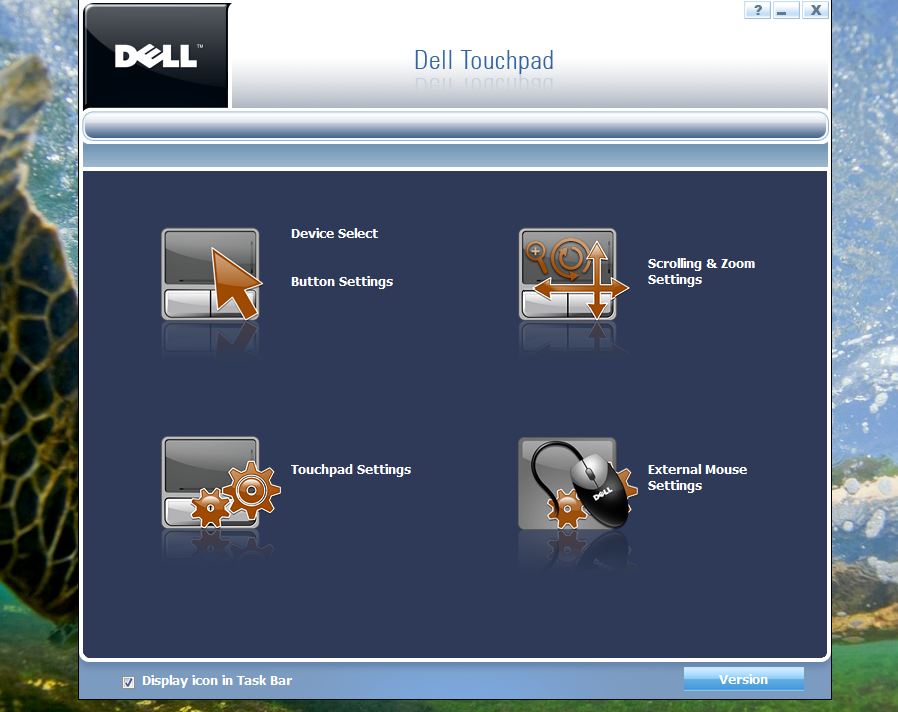
How to Disable Touchpad / Dell 1545

How to disable touchpadIf you have an annoying typing experience because of your ultra sensative touchpad, just go to Dell.com and search for your Product Name Driver or Go Here for 1545

Simply download and run and on the bottom right of your machine you will see the TouchPad icon, double click on it and disable touchpad………….Boom